
Modern AI Tools For Medical Exam Preparation: A Complete Guide To Digital Study Methods For AMC Clinical & PESCI
Are you preparing for the AMC Clinical exam or a PESCI and feeling buried under notes, guidelines and practice questions? Many International Medical Graduates (IMGs) in Australia feel the same way, especially when balancing work, family and the pressure of deadlines.
Traditional study methods still matter, but they are no longer enough on their own. IMGs are now using AI, advanced note‑taking systems and spaced repetition to study smarter, keep information organised and perform with confidence in both AMC Clinical and PESCI.
This guide is written for IMGs, overseas‑trained doctors and GPs in Australia who want a clear, tech‑friendly approach to exam preparation. You will see how to:
-
Understand where AMC Clinical and PESCI sit in the registration process
-
Build a digital “second brain” for your medical knowledge
-
Use tools like Obsidian, Readwise Reader, Anki and AI assistants (e.g. ChatGPT)
-
Design a practical study system that supports both AMC Clinical and PESCI preparation
Understanding AMC Clinical And PESCI In The Australian Context
Before you pick tools, you need clarity on what you are preparing for. AMC Clinical and PESCI assess different things, in different formats, and your digital study system should reflect that.
AMC Clinical Exam At A Glance
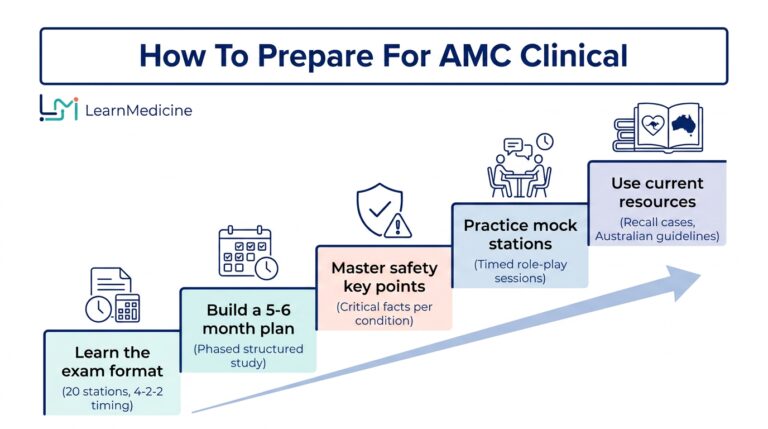
The AMC Clinical exam is a multi‑station clinical assessment for IMGs on the standard pathway. It tests whether you can practise safely in the Australian context across:
-
History taking
-
Physical examination
-
Clinical reasoning and diagnosis
-
Investigations and management
-
Communication and professionalism
The stations are typically scenario‑based, similar to OSCEs. You might be asked to:
-
Take a focused history
-
Perform a targeted examination (often verbalised)
-
Explain a diagnosis and management plan
-
Counsel a patient on risk, lifestyle change or procedures
Your study system for AMC Clinical should therefore:
-
Expose you to a wide range of presentations across age groups
-
Reinforce guideline‑consistent management in the Australian setting
-
Help you practise structured communication under time pressure
PESCI: Purpose, Providers And Where It Fits In Registration
The Pre‑Employment Structured Clinical Interview (PESCI) is different. It is not a general exam; it is a fitness‑for‑position assessment for a specific job, usually in general practice.
Key points from current guidance:
-
Required for many IMGs seeking limited or provisional registration in general practice under the standard pathway
-
Conducted by AMC‑accredited providers, currently:
-
The Royal Australian College of General Practitioners (RACGP)
-
The Australian College of Rural and Remote Medicine (ACRRM)
-
METC Institute Pty Ltd (trading as the Institute of Medical Education – IME)
-
-
Usually delivered online via videoconference (e.g. Zoom)
-
Panel of at least three assessors, including at least two medical practitioners
The panel uses clinical scenarios that mirror the type of work you will face in that position. They assess:
-
Clinical knowledge and decision‑making
-
Safe prescribing and referral
-
Communication, cultural awareness and professionalism
-
Understanding of the Australian primary care system
The outcome is documented in a report sent to both you and the Medical Board of Australia (MBA), and it informs the Board’s decision about supervision level and suitability for that role.
Key Differences Between AMC Clinical And PESCI
Your digital study plan should recognise these differences:
|
Aspect |
AMC Clinical |
PESCI |
|---|---|---|
|
Purpose |
National clinical exam for standard pathway |
Fitness‑for‑specific‑position assessment |
|
Format |
Multi‑station clinical exam |
Structured online interview with clinical scenarios |
|
Focus |
Broad safety and competence across disciplines |
Safety and suitability for one practice setting and job description |
|
Assessing Body |
Australian Medical Council |
AMC‑accredited provider; decision informed by MBA / AHPRA |
|
Outcome Use |
Part of AMC certificate & registration |
Directly attached to one role; report valid for 12 months only |
Because PESCI is position‑specific, your preparation must be closely aligned with:
-
The job description
-
The level of supervision available
-
The rural/remote or urban context of the practice
AI and digital knowledge systems are very well suited to matching your preparation to this level of detail.
The Evolution Of Medical Knowledge Management
Medical knowledge is expanding faster than any individual can memorise. IMGs are expected not only to know facts, but to apply them safely in unfamiliar systems and under time pressure.
Relying solely on handwritten notes and repeated reading often results in:
-
Disconnected information
-
Poor long‑term retention
-
Difficulty adapting knowledge to new scenarios
Digital tools and AI can change how you capture, organise and retrieve information for AMC Clinical and PESCI.
“The mind is not a vessel to be filled but a fire to be kindled.” – Plutarch
Traditional Vs Modern Study Methods
Traditional methods such as textbooks, lecture notes and highlighters still help for first exposure. The limitations appear when you reach revision and application stages:
-
Fragmented notebooks make it hard to link related topics (e.g. chest pain in ED vs chest pain in GP).
-
Re‑reading the same notes gives a sense of familiarity but does not guarantee recall under pressure.
-
Hand‑written case summaries are time‑consuming to update when guidelines change.
Modern, digital study methods focus on active recall, spacing and interconnected knowledge:
-
Notes stored in a digital system can be searched instantly, linked and tagged.
-
Spaced repetition tools such as Anki strengthen long‑term retention.
-
AI assistants can summarise, quiz you, and help you practise communication.
For AMC Clinical and PESCI, a modern system allows you to move quickly from:
“I have read this guideline”
to
“I can apply this guideline to a complex patient with limited supervision during a timed scenario.”
The “Second Brain” Approach
The “second brain” concept, popular in personal knowledge management (PKM), is about creating an external, digital memory that mirrors how your mind links ideas.
Instead of one long set of notes, you build a network of small, linked notes.
What PKM Looks Like In Medicine
PKM tools such as Obsidian allow you to:
-
Create one note per diagnosis (e.g. community‑acquired pneumonia)
-
Link it to notes on guidelines, investigations, risk scoring tools and similar differentials
-
Attach clinical cases, PESCI‑style scenarios and AMC Clinical station reflections to those notes
Over time, this becomes a living database of your learning, not just a pile of past papers.
How Medical Professionals Benefit From PKM
For IMGs, a PKM‑based second brain can:
-
Bring together AMC Clinical cases, PESCI scenarios, journal articles and local guidelines in one place
-
Make revision more efficient – instead of flicking through multiple books, you follow links across related notes
-
Provide a record of reflection that can support CPD and future assessments
“Your mind is for having ideas, not holding them.” – David Allen
Dr. Roman Pathak’s Experience With Digital Study
Dr. Roman Pathak, a recognised teacher in AMC Clinical preparation, has shifted heavily towards digital tools. By moving his notes, case templates and teaching resources into a connected system, he has:
-
Shortened the time needed to update content when guidelines change
-
Helped students structure their AMC Clinical and PESCI study around real clinical cases
-
Encouraged IMGs to build their own second brain rather than depend only on one‑off courses
The same approach is available to you with free or low‑cost tools.
Essential Digital Tools For Medical Exam Preparation
A strong digital setup for AMC Clinical, PESCI and ongoing CPD often includes three core tools:
-
Obsidian – your second brain / knowledge hub
-
Readwise Reader – your literature inbox and reading queue
-
Anki – your long‑term memory assistant
You can then add AI tools on top of this foundation.
Obsidian For Medical Knowledge Management
Obsidian is a markdown‑based note‑taking application that runs on your computer and phone. Think of it as building your own private, linked “Wikipedia” for exam preparation.
Core Features For IMGs
-
Markdown notes stored locally on your device
-
Backlinks and graph view so you can see how concepts connect
-
Folders and tags to group notes by system, exam or level of care
-
Easy integration with Readwise Reader and AI tools
Setting Up A Vault For AMC Clinical And PESCI
-
Create a new vault called something like
AMC_PESCI_Second_Brain. -
Inside, create top‑level folders such as:
-
01_Clinical_Systems(Cardiology, Respiratory, etc.) -
02_AMC_Clinical_Stations -
03_PESCI_Scenarios -
04_Guidelines_Australia -
05_Communication_Ethics
-
-
Use templates for consistency. For example, a clinical case template might include:
-
Presenting complaint
-
Focused history (ICE, red flags, risk factors)
-
Examination (what you would say/do)
-
Differential diagnoses
-
Investigations (including when not to investigate)
-
Management and safety‑netting
-
Reflection: “How would this differ in a PESCI vs AMC Clinical station?”
-
Interconnected Notes For Faster Recall
When you write notes on, say, type 2 diabetes, you can:
-
Link to PESCI‑style GP cases on chronic disease management
-
Link to AMC Clinical stations on diabetic emergencies
-
Connect to PBS prescribing rules or local referral pathways
This way, one click takes you from guidelines to station practice to PESCI interview answers.
Readwise Reader For Medical Literature
Readwise Reader collects your reading material in one place and lets you highlight and annotate it.
How It Helps For AMC Clinical And PESCI
-
Import PDF guidelines, RACGP articles, ACRRM material and journal papers
-
Read on phone or desktop and highlight key points
-
Use built‑in AI (e.g. Ghostreader) to summarise long documents into practical points
-
Sync highlights automatically into Obsidian, where they become permanent notes
Example Workflow
-
Open the current Australian hypertension guideline in Readwise Reader.
-
Highlight thresholds, first‑line medications, follow‑up intervals and red flags.
-
Use an AI summary to create a short, exam‑facing overview.
-
Export those highlights into Obsidian, under your
HypertensionandCardiovascular_Risknotes. -
From there, generate Anki cards and AMC Clinical/PESCI case prompts.
This turns every article you read into something that directly supports exam performance.
Anki For Medical Knowledge Retention
Anki is a flashcard program based on spaced repetition, one of the most evidence‑supported ways to keep information long term.
For AMC Clinical and PESCI, Anki is particularly suited to:
-
Criteria and scores (e.g. decision rules, risk scores)
-
Drug doses and monitoring
-
Red flags and differentials
-
Key phrases for safety‑netting and counselling in Australian English
Principles For Effective Anki Use
-
One concept per card – avoid long paragraphs
-
Use question → answer format, for example:
-
“Initial antibiotic choice for community‑acquired pneumonia in a low‑risk adult in Australian GP?”
-
-
Tag cards by exam and system:
#AMC_Clinical,#PESCI,#GP,#Respiratory -
Review daily, even if only for 15–20 minutes
Clinical Case Flashcards
You can also make scenario‑based cards:
-
Front: “PESCI: 45‑year‑old man with chest pain in a rural GP clinic. What are your first three steps?”
-
Back: Bullet points on immediate assessment, red flags, safety, and when to call for help or transfer.
Over time, this builds automatic responses that you can draw on under exam conditions.
Designing An AI‑Supported Study Plan For AMC Clinical And PESCI
Digital tools are powerful only if they fit into a clear study plan. Below is a framework you can adjust to your own timeline.
Step 1: Clarify Your Targets And Deadlines
-
Confirm the exam date or PESCI window.
-
Identify your registration pathway through AHPRA and the Medical Board of Australia.
-
For PESCI, gather:
-
Job offer and position description
-
Information on supervision level and practice location
-
Put all of this into a simple planning note in Obsidian (e.g. Exam_Plan_2024).
Step 2: Split Your Preparation By Exam Type
For AMC Clinical
Focus on:
-
Broad coverage of common presentations across systems
-
Practising station structure (introduction, agenda, history, examination, management, safety‑netting)
-
Time management and clear explanations
For PESCI
Focus on:
-
The practice context in your job offer
-
Common presentations in Australian general practice, including chronic disease, mental health and preventive care
-
Understanding referral pathways, supervision, and practice policies
Use tags in Obsidian and Anki such as #AMC_only, #PESCI_only, #Both to keep track.
Step 3: Build A Weekly Rhythm
A practical example for a full‑time IMG might look like:
-
Daily (1–2 hours):
-
15–20 minutes of Anki
-
30–60 minutes of case‑based study in Obsidian
-
15–20 minutes of AI‑assisted practice questions or scenario discussion
-
-
Twice Per Week:
-
Simulated AMC Clinical stations with a study partner or AI role‑play
-
One PESCI‑style interview practice focused on a scenario relevant to your job
-
-
Weekly Review (1–2 hours):
-
Update Obsidian notes based on what you got wrong
-
Add or edit Anki cards
-
Reflect briefly on communication issues, cultural factors or ethical dilemmas that came up
-
This structure is flexible; the key is to repeat small amounts consistently rather than cram.
AI‑Powered Study Support
AI tools can significantly improve how you prepare, provided you use them thoughtfully and safely.
Advanced AI Tools For Medical Learning
Some widely used AI tools for exam preparation and clinical reasoning include:
-
ChatGPT – general AI assistant that can create scenarios, summarise topics and quiz you
-
Pathway AI – supports evidence‑based clinical reasoning by surfacing guidelines and decision aids
-
Merlin AI – browser‑based assistant that can summarise and interpret online medical content
How AI Can Help With AMC Clinical And PESCI
AI can support your preparation by:
-
Generating practice questions and stations
-
“Create an AMC Clinical station on acute asthma for an adult in general practice, including examiner marking points.”
-
-
Producing PESCI‑style scenarios tied to your job description
-
“Write a PESCI interview scenario for a GP in a small rural clinic seeing a patient with chronic back pain requesting opioids.”
-
-
Summarising complex guidelines into exam‑relevant language
-
Providing structured feedback on your written explanations and management plans
Always keep in mind that AI is not a regulator or college, so you must cross‑check answers against current Australian guidelines.
Integration Strategies: Making Tools Work Together
Rather than using each tool in isolation, connect them into a simple workflow with Obsidian at the centre.
Example Workflow
-
Use Readwise Reader and Merlin AI to read and summarise a guideline.
-
Paste the summary into Obsidian, linking it to related diagnoses and cases.
-
Ask ChatGPT to create AMC Clinical stations and PESCI interview questions based on those notes.
-
Turn key facts and errors into Anki flashcards.
-
Revisit the same topic in 1–2 weeks during your weekly review.
Time Management And Boundaries
-
Set time blocks: for example, 30 minutes of AI‑generated questions, then move on
-
Avoid spending hours adjusting prompts; good enough is better than perfect
-
Never paste identifiable patient data into AI tools; keep examples de‑identified and generic
Verifying AI‑Generated Information
-
Check AI suggestions against:
-
Australian guidelines (e.g. RACGP, ACRRM resources)
-
Trusted sources such as Therapeutic Guidelines and college documents
-
-
If AI gives an answer that feels wrong or outdated, treat it as a sign to read the primary source.
Preparing For PESCI Scenarios With Digital Tools
PESCI can feel more personal than an exam, because it determines whether you are considered suitable for a specific job. Digital tools and AI can help you prepare in a structured, calm way.
Simulating The PESCI Interview Environment
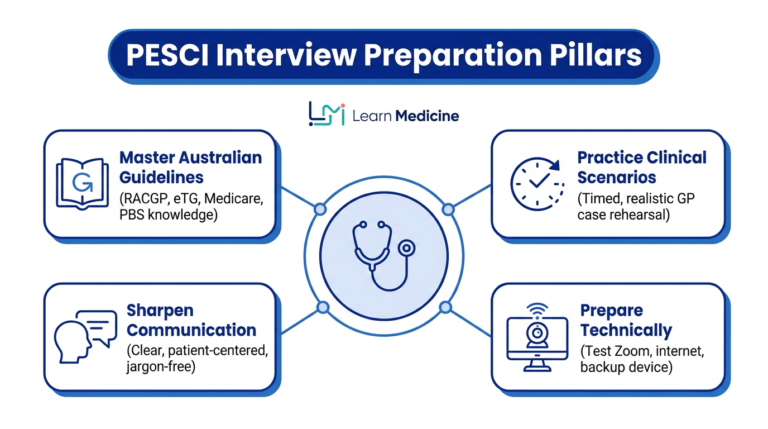
Most PESCI providers follow a similar structure:
-
Around five clinical scenarios
-
Three minutes of reading time per scenario
-
Ten minutes of questions and discussion with the panel
You can recreate this format at home:
-
In Obsidian, create a note
PESCI_Practice_Scenarios. -
Ask ChatGPT to generate cases that match your job description (e.g. rural GP, high Aboriginal and Torres Strait Islander population, after‑hours work).
-
Use a timer:
-
3 minutes to read the scenario
-
10 minutes to answer aloud, either alone, with a study partner, or to your webcam
-
-
Record yourself (audio or video) to review communication style and structure.
Over time, build a library of scenarios grouped by system (cardiology, mental health, aged care, paediatrics, reproductive health, etc.).
Practising Clinical Reasoning, Communication And Ethics
PESCI assessors look for more than correct diagnoses. They are asking: “Would I feel safe having this doctor in this role with the level of support available?”
Use AI and your second brain to practise:
-
Clinical Safety
-
Always state red flags, when you would seek senior help, and when you would transfer a patient.
-
Use Anki cards to rehearse escalation thresholds and referral criteria.
-
-
Communication In Australian General Practice
-
Practise explanations at a 6th–8th grade language level.
-
Ask ChatGPT: “Act as a PESCI assessor. Listen to my explanation of hypertension management and tell me where my language is unclear.”
-
-
Professionalism And Ethics
-
Generate scenarios involving confidentiality, prescribing pressure, boundary issues or fitness‑to‑practise questions.
-
Reflect in Obsidian:
-
What were the options?
-
Which guideline or code applies (e.g. Good Medical Practice: a code of conduct for doctors in Australia)?
-
How would I phrase this sensitively in an interview?
-
-
This kind of structured reflection helps both PESCI and AMC Clinical, where similar values are examined.
Using Feedback And PESCI Outcomes To Refine Your Study
If you receive PESCI outcome feedback – whether suitable or not suitable – it should feed straight back into your digital study system.
-
Create a note in Obsidian:
PESCI_Outcome_and_Feedback. -
List each domain where improvement was recommended (e.g. prescribing, local health system knowledge, communication).
-
For each domain:
-
Add guideline links and notes.
-
Create targeted Anki cards.
-
Ask AI to design new scenarios focusing on that weakness.
-
If your outcome is “not suitable” for a particular position:
-
Remember it relates to that role and context, not your entire career.
-
Use the written feedback as a study roadmap.
-
When you reapply or apply for a different position, you will have a clear digital record of the changes you have made.
Practical Implementation Guide
Putting a digital, AI‑supported system in place does not need to be complicated. Start small, then build.
Getting Started
-
Choose Your Core Tools
-
Install Obsidian, Anki and Readwise Reader (or another reading manager).
-
Set up accounts for ChatGPT or other AI tools you prefer.
-
-
Check Your Hardware And Access
-
Reliable computer and internet connection (important for both PESCI and online AMC resources).
-
Cloud backup or sync if you work across multiple devices.
-
-
Estimate Time And Costs
-
Many tools have free tiers; paid add‑ons are optional.
-
Be realistic: allow a week or two to become comfortable with the software before intensive exam practice.
-
-
Collect Core Resources
-
AMC Clinical sample questions and station descriptions
-
Provider‑specific PESCI handbooks (RACGP, ACRRM, IME)
-
Local Australian guidelines and college resources relevant to your position
-
Store links and files in Obsidian under a folder like 00_Reference_Documents.
Creating A Sustainable Study System
To keep your system running over months of preparation:
-
Daily Workflow
-
Start your study block with Anki reviews.
-
Move to case‑based work in Obsidian, supported by AI prompts.
-
End with a quick note on what you want to revisit tomorrow.
-
-
Weekly Reviews
-
Look back at topics you struggled with in Anki.
-
Update notes from any new RACGP/ACRRM documents or hospital policies.
-
Add 1–2 new PESCI and AMC Clinical scenarios based on that week’s learning.
-
-
Monthly Check‑Ins
-
Compare your progress with your original study plan.
-
Adjust focus: for example, move from knowledge‑heavy topics to more communication and timing practice closer to exam day.
-
If needed, seek formal teaching or courses (for example, from LearnMedicine or other providers) to cover persistent weak areas.
-
-
Long‑Term Maintenance For CPD
-
After your exams, keep your second brain alive by adding:
-
Interesting real cases (de‑identified)
-
New guidelines and CPD course notes
-
-
This turns your exam preparation system into a long‑term professional resource.
-
Future Trends And Considerations
Digital and AI‑assisted learning in medicine is developing rapidly. For IMGs in Australia, a few trends are especially relevant:
-
Virtual and augmented reality (VR/AR) simulations for clinical skills and communication practice
-
More adaptive e‑learning platforms that adjust difficulty based on your performance
-
Increasing use of online structured interviews and remote assessments, including for AMC Clinical and PESCI‑style evaluations
-
Closer integration between learning tools, electronic medical records and CPD tracking
“Better is possible. It does not take genius. It takes diligence and a willingness to try.” – Atul Gawande
While it is helpful to watch these developments, your priority should remain clear:
Build a reliable, sustainable system that keeps you safe and confident in real clinical work.
Digital tools should support, not replace, sound clinical judgement, supervision and ongoing feedback from colleagues and educators.
Conclusion
Modern AI tools, second‑brain systems and spaced repetition are changing how IMGs prepare for AMC Clinical and PESCI. When you bring them together in a coherent study system, you can:
-
Organise complex information efficiently
-
Practise exam‑specific scenarios in a way that mirrors real assessments
-
Strengthen long‑term recall of guidelines and key facts
-
Refine your communication, ethics and professionalism in the Australian context
Action Steps For Implementation
-
Set up your core digital environment with Obsidian, Readwise Reader and Anki.
-
Create structured notes for common conditions, AMC Clinical stations and PESCI scenarios.
-
Use AI tools such as ChatGPT, Pathway AI and Merlin AI to generate practice cases, summarise material and provide feedback – always cross‑checking with Australian guidelines.
-
Design a simple daily and weekly routine that includes Anki reviews, case‑based study and simulated stations or interviews.
-
After any mock exam, PESCI attempt or course, feed all feedback back into your second brain and Anki decks.
By committing to a thoughtful, digitally supported approach, you can approach both AMC Clinical and PESCI with greater clarity, confidence and consistency, and move closer to practising medicine in Australia on your own terms.
 Google