
One case at a time.
Try one case, finish it, and tell us how it went before you try another.
AI tutor
See how the LearnMedicine AI tutor supports clinical study through real lesson questions and explanations. Explore its role, limitations and access details.
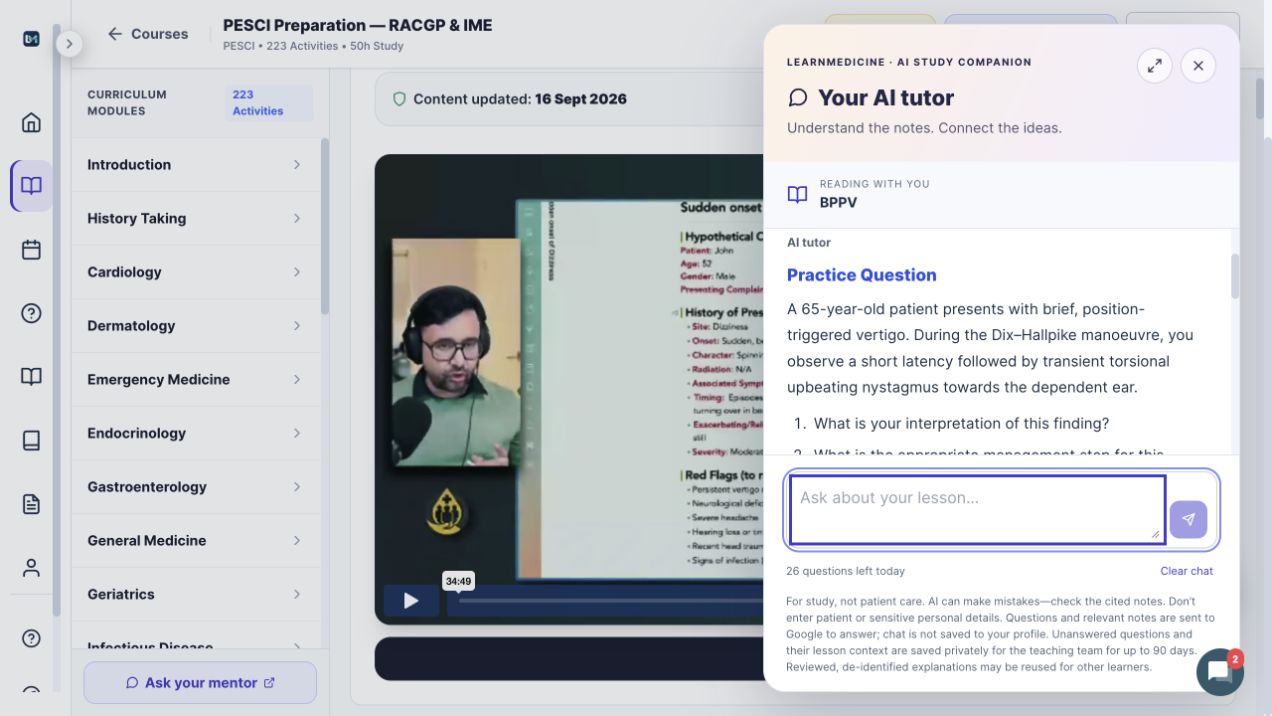
Open Ask your AI tutor while studying. The tutor can use the current teaching material to help explain a point, compare ideas or help you work through the case.
Try a focused learning question such as “Which features in this case change the differential?” or “Help me explain this point in plain language.” These are suggested prompts, not claims about a particular answer.
AI learning help is available 24/7, with up to 30 questions per UTC day while your membership is active. Service availability may be affected by maintenance.
AI can make mistakes. Check important points against the lesson and its sources. It supports education, not patient-specific medical decisions or an official assessment.
The course’s Ask your mentor link connects you with Dr Roman through Telegram. Human replies are asynchronous. Use the member group for shared discussion and current live-session arrangements.
Meet your educator and understand the support →We’re testing AI role-play: a focused space to practise speaking through a clinical case, then reflect on your approach with feedback.
It’s an early version. During the beta, we’re asking people to try one case at a time and tell us honestly what worked and what didn’t.
Sign-in required.
Try one case, finish it, and tell us how it went before you try another.
If something goes wrong, keep one of these:
Add the case name, the approximate time, and your device and browser. Please leave out any real patient or personal information.
Bring your preparation together
Recorded teaching. Regular live sessions. A real educator.
View membership